



The same tin of milk or pack of diapers costs almost the same from one shop to the next, so customers go where they feel at home and get a little more. Loyalty points and membership tiers bring customers back without discounting for everyone. But retail margins are thin, and one wrong number can make the programme eat your whole profit. This article explains how to set up the programme and how it runs at the counter.
Loyalty points and membership tiers: two different things
Lump them together and you will be stuck when a customer asks "if I redeem my points, do I drop a tier?". Keep them apart:
| Loyalty points | Membership tier | |
|---|---|---|
| What the customer gets | Points, redeemed as a discount on a later purchase | A fixed perk on every purchase once they reach the tier |
| Based on | The amount of each order | Total points earned to date |
| When the customer uses it | Remaining points go down | The tier stays the same |
| Good for | Bringing customers back next time | Keeping customers who buy a lot and buy regularly |
The key is that every customer has two numbers: total points only go up and decide the tier; remaining points are what the customer can still redeem. When a customer redeems, remaining points drop but the tier does not. Ordersys calculates it exactly this way.
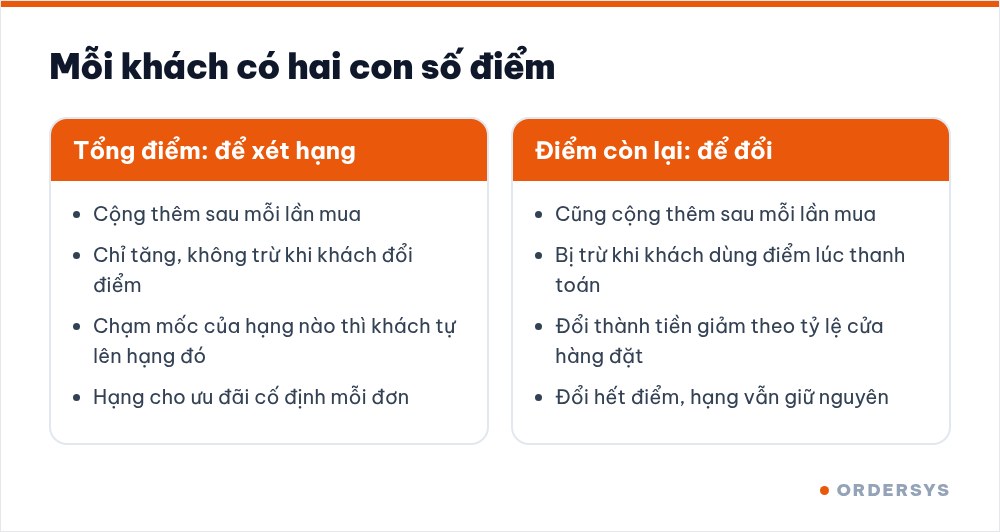
Three ways a retail shop must plan differently from a restaurant
- Margins vary widely between product groups. Milk, diapers and soft drinks usually have thin margins; cosmetics and accessories have fatter ones. The earning rate applies to the whole order, so set it for the thin-margin group customers buy most, not for the average margin. It is worth checking the profit of each item before you decide.
- Customers buy in cycles. Young parents buy milk and diapers every week; grocery customers drop by almost daily. Each order is small but adds up over a year, and membership tiers recognise exactly this group.
- Big and small orders mix. A pack of sweets and a full basket go through the same counter. If the tier discount applies to every order, even a purchase of a few thousand dong gets cut. Set the tier perk to apply only above a certain order value.
How to choose the earning rate, the redemption threshold and rewards is covered in loyalty cards: setting the numbers so they stay profitable.
Set up the programme in four steps
- Step 1: money-to-points rate. For example, 1 point for every 10,000 VND. Points are based on what the customer actually pays for the order.
- Step 2: allow redeeming points for money or not. If on, also set the points-to-money rate. If you are not ready, leave it off; customers still earn points and move up tiers as usual.
- Step 3: tiers and point thresholds. Each tier has a name and a point threshold. The software shows the matching spend for each threshold, for example 500 points at the rate above means the customer has spent 5 million VND. Have a starter tier with a low threshold so new customers see a tier after only a few purchases.
- Step 4: perks for each tier. A percentage or a fixed amount off; applied to every order or only to orders whose value falls within a from… to… range.
| Tier (example) | Point threshold | Equivalent spend | Perk per order |
|---|---|---|---|
| Member | 50 | 500,000 VND | 1% off orders from 200,000 VND |
| Silver | 500 | 5 million VND | 2% off orders from 200,000 VND |
| Gold | 1,500 | 15 million VND | 3% off every order |
The figures in the table are only an illustration; the real levels must be worked out from your shop's margins.
At the checkout: a few extra seconds per order
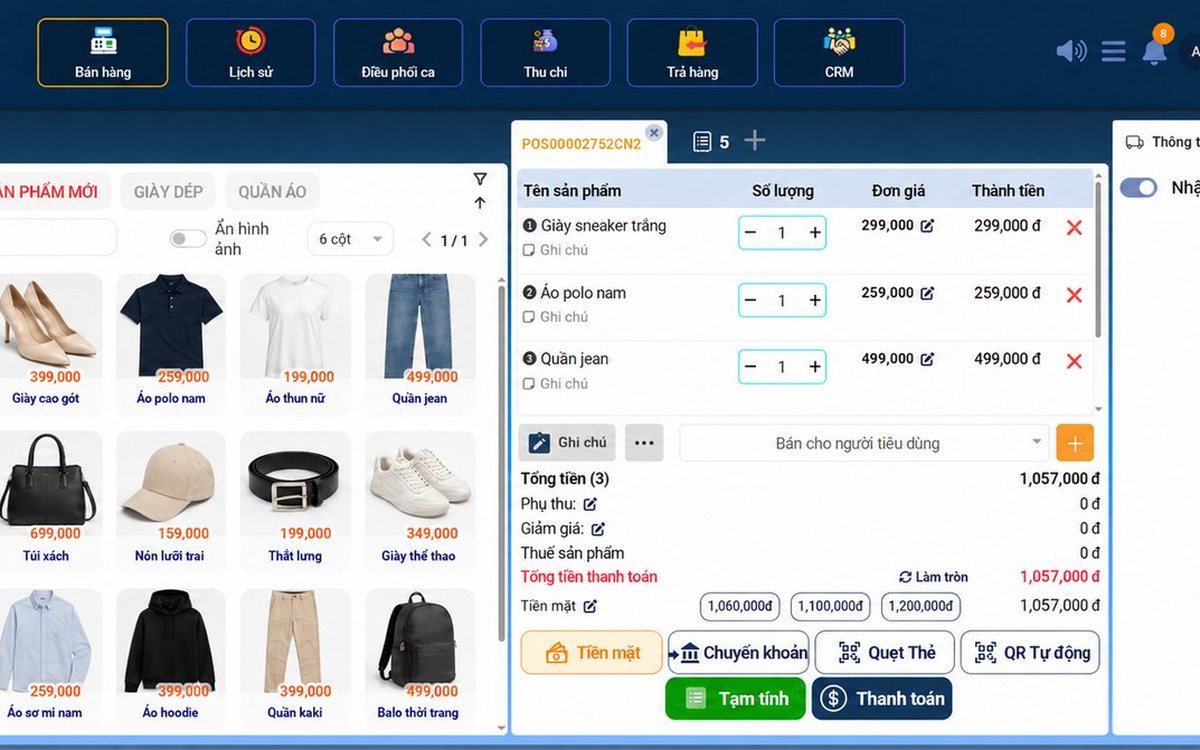
The cashier asks for the phone number and adds the customer to the order; a new customer can be added on the spot. The tier perk is calculated from the order value and shows on the member discount line. If the shop allows redemption, the payment screen has a points box: enter the points the customer wants to use or tick "Use all", next to the customer's current balance.
Once paid, the order's points are added; when total points reach a threshold the customer moves up a tier automatically, with no manual edits. The one thing to train staff on is always asking for the phone number.
Check whether the programme keeps customers
- The customer list filters by tier; for each tier you can see the member count and the list of customers.
- Each customer profile shows total purchases, accumulated points, points history and transaction history.
- After a few months, see whether the number of customers in the upper tiers is growing. High-tier customers with no recent transactions are the group to contact first.
Ordersys stores customers by phone number, adds points at payment, assigns tiers automatically from total points, and applies tier perks and point redemption right on the sales screen. See the retail management software and try it free for 7 days. Read more: loyalty cards for restaurants and cafés and checking the profit of each retail item.
Sell by barcode, track stock across units, manage debts and see profit every day.
Other news
After-sales customer care via Zalo for restaurants and cafés: five occasions and a sample line for each
You don't need many messages, just the right occasions: after a first visit, after a party, when a regular goes quiet, before a birthday and after fixing feedback. Each comes with who to send to, when, and a sample line to adapt to your shop's voice, plus how to run it in fifteen minutes a day.

Which karaoke rooms are busiest by time slot: reading reports to set prices and shifts
Look at two dimensions at once, which room and when, to see which slots are full, which sit empty and which rooms guests really choose. Measure by singing hours, not just revenue, separate weekdays from weekends, then decide hourly rates, server shifts and which rooms to fix.
Guests ordering more rounds during a meal: one bill per table, settled once
Server orders, guests adding items via QR and cashier additions at the counter all go into one open bill for the table. Kitchen tickets print only the new items; at the end, print a provisional bill, split if needed and settle once, with no paper slips to check one by one.
Recording supplier debt when receiving goods: know who you owe, how much and when it is due
Each delivery not paid in full becomes its own debt tied to the purchase receipt, with the delivery note number and due date. Pay in instalments one line at a time with documents, check due debts weekly, and reconcile at month end in minutes.

Selling multi-visit packages at a nail salon: what to include and how to deduct visits without disputes
A nail package should only cover the repeating base service; art, stones and extensions are charged separately each visit. State three things when selling, deduct visits on the ticket, and separate package sales from the value of visits performed.

Revenue reports by shift and by therapist at a massage shop: reading them to staff shifts right
Put the shift closing report, the sales report by room area and the commission report side by side to see which shifts are short-staffed, which are overstaffed, and which therapist should work which shift, then fix next week's schedule.

Splitting the bill when groups sharing a karaoke room want to pay separately
Two groups sing in the same room and each wants to pay its own part when leaving. Ask when the room is opened, record orders by group, split the bill on the system by choosing items and quantities, and agree up front on who pays for room time.
Collecting guest reviews after the meal and handling bad feedback the same day
Unhappy guests rarely speak up inside the restaurant; they quietly never come back. Ask right when the guest has just paid, let them rate in a few seconds, handle bad reviews the same day in four steps, and read weekly to spot repeated problems.

Best-selling dishes by time slot: prep the right amount and run out less at peak hours
A daily total report does not tell the kitchen how much to prep for lunch. How to split the day into time slots, pick the key dishes of each slot, convert portions into ingredients, batch by shift and read sold-out dishes correctly.
