



Saturday at nine in the evening, every room is taken and guests are waiting in the lobby. Tuesday at three in the afternoon, the whole row of rooms is dark. Every karaoke owner knows roughly this much, but a feeling cannot answer the questions that need a decision: is VIP room 2 really chosen more often than room 5, are there enough guests in the weekday early evening to add one more server, is the golden-hour pricing set in the right place. This article shows how to read reports by room and by time slot to answer those questions with your own venue's numbers.
What reports by room and time slot can answer
| Owner's question | Where to look | What it helps decide |
|---|---|---|
| Which time slots are full and which sit empty | Revenue and number of room sessions in each time slot | Setting golden hours, offers for quiet hours |
| Which rooms and room types are chosen most | Statistics by room and room type: number of sessions, total amount | Which room to fix first, whether to change a room's type |
| Which slot needs more servers | The time slot with the most room sessions | Scheduling shifts, assigning room runners |
| Which rooms sell drinks well | Drinks and food ordered into the room compared with room-time charges | Choosing rooms to promote combos and group parties |
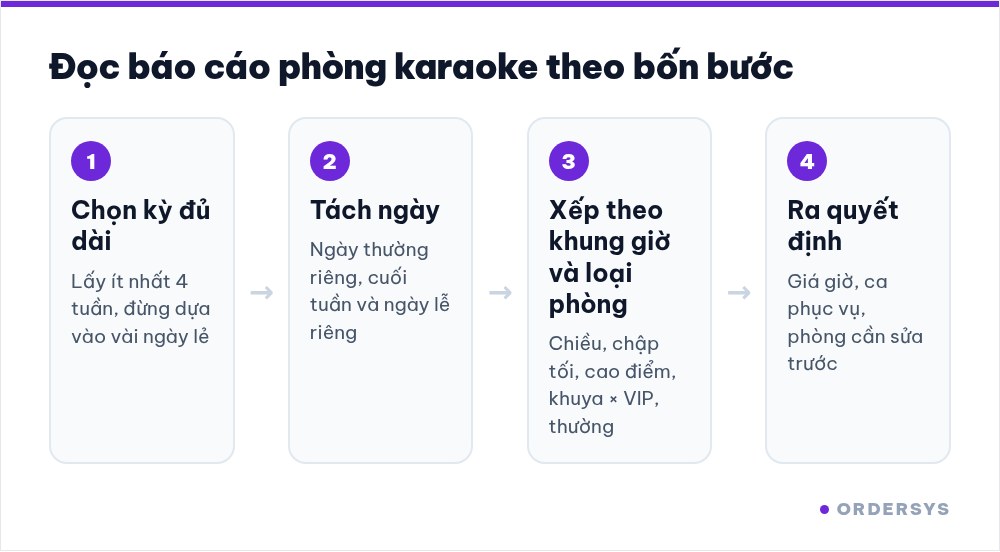
The key is to look at two dimensions at once: which room and when. A room can be very popular on weekend nights yet sit almost unused all weekday afternoon.
Measure "popular" by singing hours, not just revenue
VIP rooms usually top the revenue table, but that may only be because their hourly rate is higher. To know which rooms guests really choose, also look at how long each room is used in each time slot.
- Singing hours of a room in a slot: add up the time of every group that used that room within the slot being reviewed.
- Room usage rate: divide singing hours by the length of the slot. For example, the 7 pm to 11 pm slot lasts 4 hours; a room occupied for 3 hours has been used three quarters of the time.
- Drinks per singing hour: beer, drinks and food ordered into the room divided by singing hours. This shows which rooms have guests who both sing and order a lot.
A room with a high usage rate but modest revenue is chosen often but may be priced too low. A room with high revenue but a low usage rate lives off a few large groups and deserves a closer look before drawing conclusions.
Split time slots and group rooms so the report is easy to read
- Time slots that follow the rhythm of a karaoke venue, not hour by hour: afternoon, early evening, peak evening, late night. Four slots are enough to see where it is busy and where it is quiet.
- Separate weekdays from weekends and holidays. Lumped together, Saturday night pulls the average up and hides the quiet slots of the week.
- Group rooms by type: VIP, standard, small, large. Comparing rooms within the same type is the only fair comparison.
- Use at least four weeks. A week with a big birthday party or one heavy-rain evening will skew the numbers if you only look at a few days.
What to do after reading
- Slots that are full, with guests waiting: keep or raise the hourly rate for that slot and prioritise advance bookings so guests don't arrive only to leave. How to hold rooms for guests who book is covered in taking karaoke room bookings in advance.
- Slots that stay quiet for weeks: try a lower hourly rate or a room-plus-drinks combo valid only in that slot, then compare again after a month.
- Rooms of the same type that are rarely chosen: check the sound, air conditioning, smell and location. The problem is usually the room, not the price.
- The slot with the most room sessions: add servers for exactly that slot instead of adding people for the whole shift.
Every time you change prices or shifts, note the date of the change so next month you can compare before and after clearly, instead of relying on a feeling that "it seems busier".
How Ordersys helps
With Ordersys karaoke management software, each room is started and stopped right on the room map, and room time and items ordered into the room sit on the same bill, so report data comes straight from each real guest session. Reports show revenue by hour of the day and statistics by room and by room type, filtered by today, week, month or a custom date range, with Excel export for further calculations. Venues can try it free for 7 days. Once you know which slots are busy and which are quiet, see hourly rates for VIP rooms, standard rooms and golden hours for setting the price table, and read karaoke room servers: shifts and drink commissions for scheduling room runners.
Staff take orders on their phones, the kitchen gets them instantly, guests order and pay by QR, owners see revenue remotely.
Other news
Loyalty points and membership tiers for retail shops: how to set them up without eating your profit
Loyalty points and membership tiers are two different things: each customer has total points that decide the tier and remaining points to redeem, and redeeming never drops the tier. Three ways retail must plan differently from restaurants, four setup steps with a sample tier table, and how it runs at the checkout.
After-sales customer care via Zalo for restaurants and cafés: five occasions and a sample line for each
You don't need many messages, just the right occasions: after a first visit, after a party, when a regular goes quiet, before a birthday and after fixing feedback. Each comes with who to send to, when, and a sample line to adapt to your shop's voice, plus how to run it in fifteen minutes a day.
Guests ordering more rounds during a meal: one bill per table, settled once
Server orders, guests adding items via QR and cashier additions at the counter all go into one open bill for the table. Kitchen tickets print only the new items; at the end, print a provisional bill, split if needed and settle once, with no paper slips to check one by one.
Recording supplier debt when receiving goods: know who you owe, how much and when it is due
Each delivery not paid in full becomes its own debt tied to the purchase receipt, with the delivery note number and due date. Pay in instalments one line at a time with documents, check due debts weekly, and reconcile at month end in minutes.

Selling multi-visit packages at a nail salon: what to include and how to deduct visits without disputes
A nail package should only cover the repeating base service; art, stones and extensions are charged separately each visit. State three things when selling, deduct visits on the ticket, and separate package sales from the value of visits performed.

Revenue reports by shift and by therapist at a massage shop: reading them to staff shifts right
Put the shift closing report, the sales report by room area and the commission report side by side to see which shifts are short-staffed, which are overstaffed, and which therapist should work which shift, then fix next week's schedule.

Splitting the bill when groups sharing a karaoke room want to pay separately
Two groups sing in the same room and each wants to pay its own part when leaving. Ask when the room is opened, record orders by group, split the bill on the system by choosing items and quantities, and agree up front on who pays for room time.
Collecting guest reviews after the meal and handling bad feedback the same day
Unhappy guests rarely speak up inside the restaurant; they quietly never come back. Ask right when the guest has just paid, let them rate in a few seconds, handle bad reviews the same day in four steps, and read weekly to spot repeated problems.

Best-selling dishes by time slot: prep the right amount and run out less at peak hours
A daily total report does not tell the kitchen how much to prep for lunch. How to split the day into time slots, pick the key dishes of each slot, convert portions into ingredients, batch by shift and read sold-out dishes correctly.
