



Many shops switch on loyalty points, and three months later the list shows a few hundred customers with points but only a handful who have ever redeemed a reward. Earning points still works; what usually breaks is the redemption side: the rewards are not appealing enough, customers do not know they are close to a reward, or redeeming at the counter is clumsy so staff avoid mentioning it. How to set the earning rate and redemption threshold is covered in loyalty cards for your shop: setting the numbers so you still make a profit. This article covers the rest: choosing rewards, setting them up so the cashier does not calculate by hand, introducing the programme at the counter, and measuring whether customers really take part.
Choosing rewards: worth it to customers, cheap for the shop
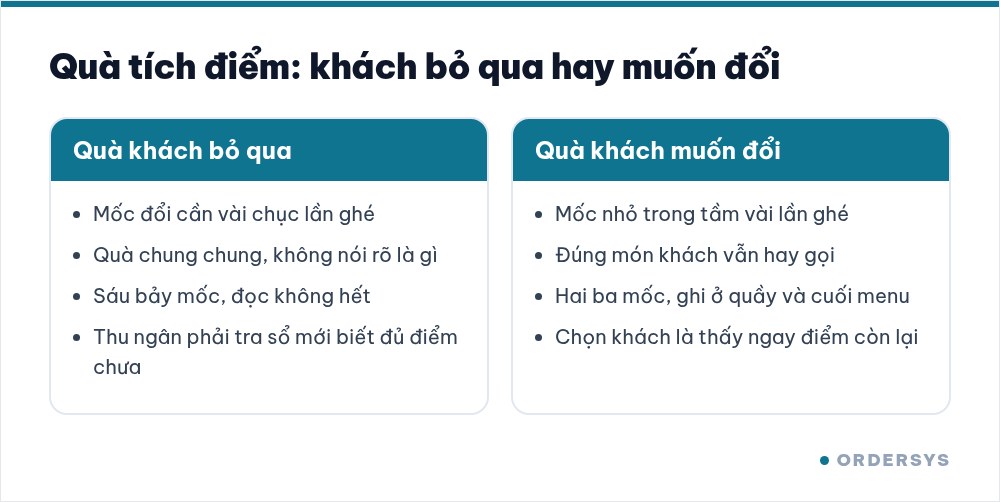
A good reward is something customers value more than what the shop actually spends on it. Four common kinds of reward:
| Type of reward | What customers see | What the shop really spends |
|---|---|---|
| A best-selling item: a coffee, a fruit plate | Exactly what they usually order | The item's cost, lower than its selling price |
| A new or less popular item | A chance to try something new | The item's cost, and maybe a future sale of that item |
| Money off the bill | Clear and easy to understand | Exactly the amount discounted |
| Physical gifts: tumblers, tote bags | Nice-looking, something to take home | Cost of the gifts, storage space, separate counting |
Small shops should start with items on the menu. Physical gifts look nice but have to be bought and counted separately; if they run out halfway, customers who saved enough points get no reward, which hurts trust more than having no programme at all. Two or three tiers are enough: a small tier within a few visits so new customers feel it is close, and a bigger tier for regulars. With six or seven tiers the cashier cannot remember them and customers will not read them all.
Set rewards up in the software so the cashier does not calculate by hand
If redeeming means the cashier has to flip through a notebook and use a calculator to check whether a customer has enough points, nobody will bring it up at busy times. Let the software handle it:
- Money-to-points rate. For example, 1 point for every 10,000 VND the customer pays. Points are added automatically at payment.
- Each tier is one line. Tier name, points required, and the benefit: a fixed amount off or a percentage off.
- If the reward is an item, set the discount equal to that item's price. The customer orders the item, redeems points, and the bill drops by exactly the item's price. No need to add a separate "free item" to the menu.
At payment, as soon as the cashier selects the customer they see the tier and remaining points. If there are enough points, the software deducts them and applies the discount to the bill; if not, it shows that there are not enough points, so there is nothing to argue about. Customers who want to save up for a bigger tier simply do not redeem that time, and their points are kept.
Introducing the programme at the counter
However good the programme is, if nobody mentions it customers forget. Three moments to say something, one sentence each:
- When first asking for a phone number: "Leave your number to collect points, 50 points gets you a free drink." Name the actual reward, do not just say "we have points". For how to ask so customers are happy to share, see asking for customers' phone numbers at checkout.
- At every payment: tell them their points and how far they are from a reward. "You have 42 points, one more visit and you can redeem."
- When the customer has enough points: ask whether they want to redeem now or save up; do not redeem on their behalf.
Add a small sign at the counter or a line at the bottom of the menu listing the rewards and points needed. If customers can read it, staff have less to explain.
Measuring whether customers really take part
Three numbers each month are enough to tell whether the programme is alive or dead:
- Number of new customers leaving a phone number. If it is low, the problem is at the counter, not with the rewards.
- Number of redemptions. Each redemption is saved in the customer's points usage history: points, tier redeemed, amount converted, redemption date, points remaining. If many customers have enough points but few redeem, the rewards are not appealing yet; change the rewards before lowering the threshold.
- Whether customers who redeemed come back. Look at those customers' last transaction after a month or two. If they redeem and then disappear, the reward is paying for a visit they were going to make anyway.
How Ordersys helps
Ordersys CRM software stores customers by phone number, adds points right at payment at the rate the shop sets, lets you set up reward tiers as money off or percentage off, and shows the cashier the customer's remaining points right on the sales screen. Each customer's points usage history, along with visit frequency and returning-customer figures, tells the shop whether the programme is keeping customers. You can try it free for 7 days.
Ordersys has editions for restaurants and for retail stores: checkout, stock, reports and e-invoices, with on-site setup and training.
Other news

Karaoke room map: seeing free rooms and rooms in use, and seating guests at peak hours
A karaoke room map has to answer three questions: which rooms are free, which are in use and which are booked. How to name and group rooms to match the real venue, four steps for reading the map to seat guests at peak hours without clashing with bookings, and two places where the map in the system often drifts from the real rooms.
Calculating customer lifetime value (CLV) for your shop: what a regular customer is worth
CLV is the money a customer brings in over the whole time they keep coming back. A four-number formula good enough for restaurants, cafés and spas and where to get each number, a trial calculation with assumed figures, using CLV to cap the cost of winning new customers, size offers for regulars and pick which group to focus on, plus three common mistakes.
Guests check their order and order more via QR: fewer "where is our food?" questions
The same QR page guests order from also holds the table's order: the item list, the status of each item, the subtotal and whether it is paid. How statuses appear depending on the kitchen setup, ordering more and calling staff from the same page, and three things to make guests actually use it.

Switching karaoke rooms while keeping singing time and ordered drinks: how to charge without arguments
When guests ask to switch rooms mid-session, karaoke venues often lose an hour of singing time or charge a beer case twice. Four reasons for switching and how to charge for each, what to tell guests before moving them, five steps to switch rooms without losing money, and how to stop transfers being used to undercharge.
Loyalty points and membership tiers for retail shops: how to set them up without eating your profit
Loyalty points and membership tiers are two different things: each customer has total points that decide the tier and remaining points to redeem, and redeeming never drops the tier. Three ways retail must plan differently from restaurants, four setup steps with a sample tier table, and how it runs at the checkout.
After-sales customer care via Zalo for restaurants and cafés: five occasions and a sample line for each
You don't need many messages, just the right occasions: after a first visit, after a party, when a regular goes quiet, before a birthday and after fixing feedback. Each comes with who to send to, when, and a sample line to adapt to your shop's voice, plus how to run it in fifteen minutes a day.

Which karaoke rooms are busiest by time slot: reading reports to set prices and shifts
Look at two dimensions at once, which room and when, to see which slots are full, which sit empty and which rooms guests really choose. Measure by singing hours, not just revenue, separate weekdays from weekends, then decide hourly rates, server shifts and which rooms to fix.
Guests ordering more rounds during a meal: one bill per table, settled once
Server orders, guests adding items via QR and cashier additions at the counter all go into one open bill for the table. Kitchen tickets print only the new items; at the end, print a provisional bill, split if needed and settle once, with no paper slips to check one by one.
Recording supplier debt when receiving goods: know who you owe, how much and when it is due
Each delivery not paid in full becomes its own debt tied to the purchase receipt, with the delivery note number and due date. Pay in instalments one line at a time with documents, check due debts weekly, and reconcile at month end in minutes.
